Deployment Activity: Deploy a Calculator Web App
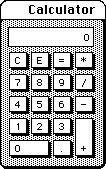
Using VS Code and GitHub Copilot, create a Node.js React web app for a basic calculator.
#/media/File:Macintosh_Calculator_1984.png)
Create the App and Run Locally
The app must have a React frontend and a Node.js backend. Organize the codebase in a monorepo.
Frontend: The frontend should contain the following buttons:
- Numbers: 0–9, . (decimal)
- Functions: See table below.
| Button | Function |
|---|---|
| + | Addition |
| - | Subtraction |
| × | Multiplication |
| ÷ | Division |
| = | Enter - performs the pending calculation and displays the result |
| C | Clear - deletes the entire calculation |
| CE | Clear Entry - deletes only the most recent number or operation entered without erasing the entire, ongoing calculation |
- It should create a string with the current expression as the user presses buttons and display it at the top.
- Handle C (Clear) and CE (Clear Entry) on the frontend.
Backend: The backend should compute the value of the expression.
- It has one public function:
string calculate(string)
When the user presses =, the frontend should call calculate() on the backend with the current expression and display the return value at the top of the calculator.
Run your calculator locally, and test it out to make sure it works.
Sign Up for Amazon AWS
You will begin by setting up your Amazon AWS account. You will need AWS access for all steps of this activity.
None of the steps below should cost money; however, the AWS Free Plan setup will likely require a credit card to be on file. As of this time, AWS assures that "No charges incurred unless you switch to the Paid Plan".
To setup an account, go to the AWS Console and sign up for the Free Plan. If one person on your team already has an AWS account, you may use that one.
Deploy Calculator Frontend to AWS Amplify
Next, you will use AWS Amplify to host your frontend application. Amplify will store and serve static web assets, like HTML, CSS, and JS files, that comprise your application frontend. Amplify makes it easy to deploy app frontends and integrate with version control. In this assignment, you will use Amplify to manage deployment of the frontend of your calculator application.
First, check your calculator app into a GitHub repo.
Then, deploy the app using AWS Amplify:
- Connect to AWS Console (https://console.aws.amazon.com).
- Create an AWS account if you don’t have one.
- Go to AWS Amplify and connect it to your GitHub.
- Authorize AWS Amplify to use your GitHub account.
- Pick your calculator repo and branch. (Ask us if you don’t see it in the pulldown.)
- Check the box "My app is a monorepo."
- Fill in the root directory of your frontend app.
- Save and deploy.
Finally, visit the deployed URL.
If you run into trouble, this tutorial may help: https://docs.aws.amazon.com/amplify/latest/userguide/getting-started-next.html
Deploy Calculator Backend to AWS Lambda
Next, you will set up your backend application to run with AWS Lambda. AWS Lambda lets you run server code without having to deal with actual server machines. It's a "serverless" computing service. You will modify your backend to run on AWS Lambda.
To use Lambda, you will
- Write (slightly stylized) code that executes functions on certain events (e.g., the invocation of a given REST endpoint)
- Package up your code (i.e., put it all in a ZIP file)
- Upload the packaged code to AWS
First, set up some AWS tools:
- Install the AWS CLI (e.g., the awscli Homebrew formula on macOS).
- Install AWS Toolkit extension into VS Code.
Then, create a new function in Lambda:
- From the AWS Console, open up Lambda; choose Create Function; choose Author from scratch; enter
calculateas the Function name; choose Node.js as the Runtime; click Create function. - Copy the
index.mjsfile to your calculator backend codebase. - Connect the handler to your
calculate()function. - Deploy your Lambda function with a
.zipfile archive.
You may wish to ask your LLM to assist in the following ways:
- Ask your LLM to modify your backend code so that it executes as a lambda function. Eventually, that lambda function will execute when your REST API's public interface endpoints receive post requests.
- Ask your LLM for detailed instructions on how to use AWS Lambda to set up a dummy application that you can invoke. This will help you get familiar with AWS Lambda when you have to set up your own application.
- Ask your LLM to teach you how to package your Javascript code for deployment on AWS and upload it with the AWS CLI.
- Ask your LLM to teach you how to modify the Lambda code so that it is invoked by requests to your API's public interface functions.
If you run into trouble, these tutorials may help:
- https://docs.aws.amazon.com/lambda/latest/dg/nodejs-package.html
- https://docs.aws.amazon.com/lambda/latest/dg/services-apigateway-tutorial.html
Connect REST API to Calculator
AWS API Gateway makes it simple to spin up an API. A web API exposes endpoints that users (or applications) can interact with. You are going to create a REST API for the backend of your app that exposes all of your public interfaces functions.
To set up your API, modify the Lambda code so it is invoked by HTTP POST requests to your calculate() function.
Step 1: Open the AWS API Gateway console.
- Create API
- In the REST API box, choose Build
- Under API details, enter Calculator
Step 2: In the Resources page for your API, choose Create Resource
- ResourceName is CalculatorManager
Step 3: Create an HTTP POST method
- In Resources, highlight CalculatorManager. Choose Create Method Method Type: POST
- Integration type: Lambda
- Lambda: enter LambdaFunctionOverHttps
Step 4: Deploy the API
- In Resources, choose Deploy API
- Stage: New stage: test
Step 5: Update Frontend App to Use API
- After setting up AWS API Gateway, locate the API call logic in your frontend code (where it currently calls localhost).
- Replace the localhost URL with the API Gateway endpoint URL.
- Note, edit the code carefully to preserve a version of the app that runs locally for easier testing.
You may wish to ask your LLM to teach you how to create your REST API with AWS API Gateway.
If you run into trouble, this tutorial may help: https://docs.aws.amazon.com/lambda/latest/dg/services-apigateway-tutorial.html